Newegg · Verified Oct 31, 2026
$250 $270
more
↑ less
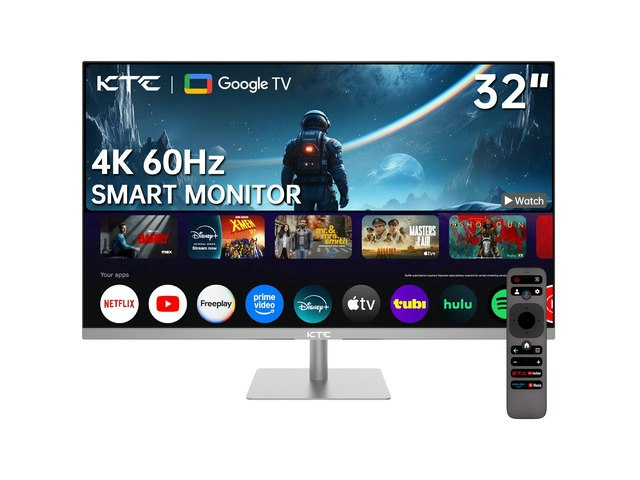
Setting up a secondary room or small apartment gets easier with this 32-inch 4K set, and at $250 it's $20 off the $270 list price. Buy Now at Newegg
Features
- 3840x2160 (4K) resolution, 60Hz refresh rate
- HDR10
- Google TV with voice remote
- 1x USB-C 65W port, 2x HDMI ports
- Model: A32Q8
4K TVs: The Basics
The television has come a long way from the old black and white screens of the 1950s. In fact, TV technology has probably evolved faster in the past ten years than in the previous 30. The holy grail of getting a good TV is, of course, getting the clearest picture possible. The latest iteration of that goal is the 4K TV, and the experts at DealNews are here to help you choose the best 4K TV for your needs.
What’s a 4K TV?
Glad you asked! The most dedicated tech-heads would insist it means the television has 4,000 lines of horizontal resolution. However, the reality is a little different. Most 4K televisions have 3,840 lines. But that’s pretty close to 4,000, and the term “4K” is easier to remember.
Blog Articles
DealNews has a lot of great Blog posts you can check for more information about TVs in general, and 4K sets specifically. You can read these to get a little more knowledgeable about the TV market and what’s available:
Where to buy 4K TVs?
Most brick-and-mortar and online stores sell 4K televisions. Here are a few to check out:
Common 4K TV terms
When you start looking for 4K TV deals, you’re bound to run into terms that don’t make a lot of sense. Here are some common terms defined, so you’ll know what you’re seeing in the stores:
HDR: High Dynamic Range. HDR refers to the color spectrum and brightness of the display. There are different HDR programs, though, with the most popular ones being HDR10, HDR10+, and Dolby Vision. (For more information, see our HDR guide .)
LED Terms: The actual illumination/pixel panel of the TV.
- LED LCD: Light Emitting Diode/Liquid Crystal Display. It's the most inexpensive and common panel in consumer TVs. It uses LEDs behind (or on the edges of) the LCD panel to illuminate the pixels in large localized groups.
- QLED: Quantum-Dot Light Emitting Diode. The pixels in these panels are lit by LEDs along the edges of the panel (similar to LED LCD panels), but they also use a quantum dot filter to achieve higher brightness than OLED panels — at the expense of response time, contrast, and black levels.
- OLED: Organic Light-Emitting Diode. These TVs essentially have a thin film that can illuminate individual pixels when supplied with current, thus creating more brightness and a truer black level. These also tend to be much slimmer TVs, since they don’t use traditional LED backlighting. (They’re also usually the most expensive kind of display.)
Refresh Rate: This is how quickly a display refreshes an image. The faster it happens, the less motion blur is observed in quick-moving images. The standard is 60Hz, although 120Hz rates (and higher) are becoming more common. Beware, though: Some manufacturers often obscure the actual specs with terms like “motion rate” or “effective refresh rate.” But it’s all refresh rate.
Smart TV: A smart TV will connect to the Internet, either via WiFi or an Ethernet cable, and it comes with built-in streaming apps like Netflix, Hulu, and HBO Now. Most 4K TVs are “smart,” but you can always use your preferred streaming device like Roku or a Fire TV Stick to get your desired programming.
Frequently Asked Questions
What size 4K TV should I buy?
Many people would say, “Bigger is always better!” That may be true, but buying bigger also means having a bigger budget and a bigger room for your TV to live in. So the first thing you have to do is decide what your budget is, and how much space you have for your new TV.
If you don’t have much room, or you live in an upstairs apartment, for instance, it may not be practical to buy an 80” TV! Even if you do have the space for a large TV, staying within your budget is still important.
Can I mount my TV on the wall?
Maybe. If you have wall space and can attach items to a wall (if you live in an apartment, check with management first), you probably can. Make sure your mounting hardware can handle the TV size you choose, and that you have the tools to install the bracket properly.
Otherwise, it’s always safe to have your TV sitting on a cabinet or another platform that can hold it. While a cabinet may take up floor space, you can use it for storage or other hardware, like a router, cable box, or satellite box.
If I’m not happy with my TV, can I return it?
Most stores have a return policy that includes TVs. It’s usually posted on the store website, so it’s always a good idea to check that out before you buy. If you buy in a store, ask an associate about the policy. Make sure you keep the receipt, invoice, or packing slip (if you have it shipped), as well as the box — at least until you know you want to keep the set.
How do I connect my TV to the internet?
Most TVs will come with a remote, and will walk you through the steps via the setup menu. Make sure you have your router’s password handy when you do this. Some sets may automatically detect your WiFi and simply prompt you to enter the password.
Should I choose an LED, QLED, or OLED display?
You’re buying a big ticket item, so your budget will determine your purchase. If there’s not much difference in the price between the LED and QLED displays at the size you want, you may want to bump up to the QLED set for a better, clearer picture.
Buying OLED will cost much more. An OLED set may cost twice as much as a QLED set, but you will get the OMG! picture clarity you paid for. Just make sure you have the cash on hand.
Do all cable/satellite providers offer 4K service?
No, but that’s changing. More cable providers (and streaming services) are upgrading their service to be compatible with 4K TVs. Of course, you can still watch regular TV with a non-4K provider. Some local network channels offer separate digital HD channels for a better viewing experience.
How do I find great deals on 4K TVs at DealNews?
You can shop the latest and best deals for 4K TVs on DealNews in three ways:
By: Amy Pollick, Content Writer
Amy Pollick lives in Decatur, Alabama and is based in our Huntsville office. She worked over 23 years for a daily newspaper and has been at DealNews since April 2016. She's married and has three spoiled cats. A music nut, she can be found listening to the Beatles, the Eagles, Nitty Gritty Dirt Band, and other quality bands/tunes.
Want to know the moment we post a great deal on TVs?
Create an Alert